Payroll Hours Calculator
This payroll hours calculator works like a time card. Enter the clock-in time, clock-out time and unpaid break for each day of one or two weeks. It gives daily and weekly totals in hours and minutes and in decimal hours, overtime over 40 hours in a workweek, and gross pay at an hourly rate.
Nothing you enter is stored or sent. The math runs in your browser and the entries are gone when you close or reload the page. All pay figures are gross pay before taxes and withholding. Federal rules under the Fair Labor Standards Act (FLSA) are shown, and state rules can differ. This is general information and not legal advice.
How the payroll hours calculator works
Use it as a work hr calculator for a single shift or as a time card for the whole pay period. For each day the calculator takes the clock-out time minus the clock-in time, then subtracts the unpaid break. It adds the days in each workweek, and then adds the weeks.
- Daily hours = clock-out time − clock-in time − unpaid break.
- Weekly hours = the sum of the daily hours in one workweek.
- Overtime hours = weekly hours over 40. Regular hours = the rest.
- Gross pay = regular hours × hourly rate + overtime hours × hourly rate × 1.5.
Worked example: payroll hours for one week
Alex is paid $20.00 an hour and works Monday to Friday from 8:00 AM to 5:00 PM with a 30 minute unpaid lunch. Each day is 9 hours less 30 minutes, which is 8 hours 30 minutes or 8.50 decimal hours. The week is 42 hours 30 minutes, or 42.50 hours. Regular pay is 40 × $20.00 = $800.00. Overtime is 2.50 hours at $30.00 = $75.00. Gross pay is $875.00. Enter the same times above and the calculator gives the same figures.
Workweeks, overtime and the biweekly pay period calculator
The US Department of Labor says covered, non-exempt employees must receive overtime pay for hours worked over 40 in a workweek, at a rate not less than time and one-half their regular rate of pay. A workweek is a fixed and regularly recurring period of 168 hours, which is seven 24-hour periods in a row. It can begin on any day and at any hour of the day. Averaging hours over two or more weeks is not permitted, so each workweek is counted on its own. The source is Department of Labor Fact Sheet #23. For that reason the two-week option works as a biweekly pay period calculator that totals each week separately before adding them. Federal law has no daily overtime, though some states do.
A shift that runs past midnight is shown on the day it starts. If your workweek ends at midnight in the middle of that shift, split the shift into two rows so each part lands in the right week. This hours and pay calculator multiplies by the hourly rate you enter. If a bonus was earned or two pay rates were worked in the week, the overtime rate is based on the regular rate, and the overtime calculator in Related tools handles that.
Meal breaks and rest breaks
The Department of Labor says bona fide meal periods, typically 30 minutes or more, generally need not be compensated as work time. The employee must be completely relieved from duty for the purpose of eating regular meals. Short rest periods, usually 20 minutes or less, are customarily paid and must be counted as hours worked. So enter only unpaid meal breaks in the break box, and leave paid rest breaks out. The source is Fact Sheet #22: Hours Worked. The FLSA does not require employers to give breaks or meal periods, but some states do. See the Department of Labor’s FLSA questions and answers.
Rounding time to the nearest quarter hour
The Department of Labor says an employer may round employee time to the nearest quarter hour. Time from 1 to 7 minutes may be rounded down, and time from 8 to 14 minutes must be rounded up and counted as a quarter hour of work time. An employer may violate the minimum wage and overtime rules if it always rounds down. The source is Fact Sheet #53. The federal regulation at 29 CFR 785.48 accepts rounding to the nearest 5 minutes, tenth of an hour or quarter hour only if, over time, it does not leave employees underpaid for the time they actually worked. With the rounding option on, a clock-in at 7:53 AM counts as 8:00 AM and a clock-out at 5:08 PM counts as 5:15 PM. We checked these federal rules on dol.gov on October 8, 2026.
Minutes to decimal hours conversion chart
Payroll systems usually want hours as decimals. Divide minutes by 60, or read the value from the chart. Values are rounded to two decimal places.
| Minutes | Hours | Minutes | Hours | Minutes | Hours |
|---|---|---|---|---|---|
| 1 | 0.02 | 21 | 0.35 | 41 | 0.68 |
| 2 | 0.03 | 22 | 0.37 | 42 | 0.70 |
| 3 | 0.05 | 23 | 0.38 | 43 | 0.72 |
| 4 | 0.07 | 24 | 0.40 | 44 | 0.73 |
| 5 | 0.08 | 25 | 0.42 | 45 | 0.75 |
| 6 | 0.10 | 26 | 0.43 | 46 | 0.77 |
| 7 | 0.12 | 27 | 0.45 | 47 | 0.78 |
| 8 | 0.13 | 28 | 0.47 | 48 | 0.80 |
| 9 | 0.15 | 29 | 0.48 | 49 | 0.82 |
| 10 | 0.17 | 30 | 0.50 | 50 | 0.83 |
| 11 | 0.18 | 31 | 0.52 | 51 | 0.85 |
| 12 | 0.20 | 32 | 0.53 | 52 | 0.87 |
| 13 | 0.22 | 33 | 0.55 | 53 | 0.88 |
| 14 | 0.23 | 34 | 0.57 | 54 | 0.90 |
| 15 | 0.25 | 35 | 0.58 | 55 | 0.92 |
| 16 | 0.27 | 36 | 0.60 | 56 | 0.93 |
| 17 | 0.28 | 37 | 0.62 | 57 | 0.95 |
| 18 | 0.30 | 38 | 0.63 | 58 | 0.97 |
| 19 | 0.32 | 39 | 0.65 | 59 | 0.98 |
| 20 | 0.33 | 40 | 0.67 | 60 | 1.00 |
Questions about payroll hours
How do I calculate payroll hours?
Take the clock-out time minus the clock-in time for each day, subtract any unpaid break, and add the days together. A shift from 8:00 AM to 5:00 PM with a 30 minute unpaid break is 8 hours 30 minutes, or 8.50 decimal hours. Five of those shifts make 42 hours 30 minutes for the week. The payroll hours calculator on this page does this for one or two weeks.
How do I convert minutes to decimal hours for payroll?
Divide the minutes by 60. 15 minutes is 0.25 hours, 30 minutes is 0.50 hours and 45 minutes is 0.75 hours. So 7 hours 45 minutes is 7.75 hours. Multiply decimal hours by the hourly rate to get pay.
Is a lunch break paid?
Under federal law a bona fide meal period, typically 30 minutes or more, generally does not have to be paid, as long as the employee is completely relieved from duty. Short rest breaks, usually 20 minutes or less, must be counted as hours worked. Federal law does not require employers to give breaks at all, though some states do.
Can an employer round time to the nearest 15 minutes?
Yes. The Department of Labor says an employer may round employee time to the nearest quarter hour. Time from 1 to 7 minutes may be rounded down, and time from 8 to 14 minutes must be rounded up. An employer that always rounds down may violate the law, because rounding must not result in employees being underpaid over time.
How is overtime calculated on a biweekly pay period?
Each workweek is counted on its own. Hours cannot be averaged across the two weeks. Someone who works 45 hours in week one and 35 hours in week two has 80 hours in total and is owed 5 hours of overtime for week one. At $20.00 an hour that is $1,500.00 of regular pay plus $150.00 of overtime pay, a total of $1,650.00.
How do I calculate hours for an overnight shift?
Count from the clock-in time to midnight, then add the time from midnight to the clock-out time. A shift from 10:00 PM to 6:30 AM is 8 hours 30 minutes. With a 30 minute unpaid break it is 8 hours of paid time. The calculator treats a clock-out time earlier than the clock-in time as the next day.
Related tools
- Overtime calculator: overtime pay with the regular rate for bonuses, two pay rates and salaried non-exempt employees.
- Time and a half calculator: time and a half and double time rates for any hourly rate.
- Pay raise calculator: new pay from a percent raise, for salary or hourly pay.
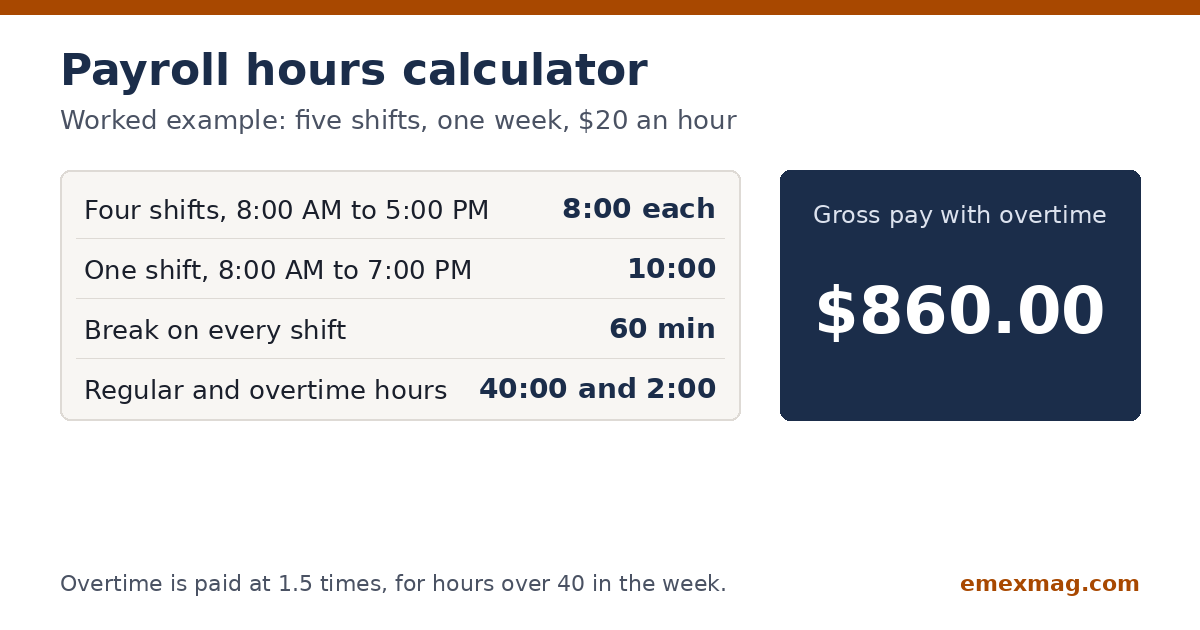
Use this payroll hours calculator to add clock-in and clock-out times for one or two weeks. It takes off breaks, handles overnight shifts and works out overtime and gross pay.